
Kernel - The Core of an Operating System
Introduction
While learning Linux, I explored the concept of the kernel through GeeksforGeeks. I learned about its role in an operating system, the responsibilities it handles, and the different types of kernel architectures.
The kernel is one of the most fundamental concepts to understand before exploring Linux internals, process management, memory management, device drivers, and system calls.
This journal brings those ideas together into a practical reference that explains not only what a kernel is, but also how it works and why its design matters.
1. What Is a Kernel?
A kernel is the core component of an operating system that manages hardware resources and provides essential services to programs.
Applications need CPU time, memory, storage, networking, and access to hardware devices. They cannot safely control these resources independently. The kernel coordinates access and enforces rules that allow multiple programs to run together.
Think of the kernel as a resource manager between applications and the hardware.
A Simple Analogy
Imagine a college computer laboratory:
- Applications are students who need to use the computers.
- Hardware consists of computers, memory, storage, and peripherals.
- Kernel acts like the laboratory manager, allocating resources, enforcing rules, and coordinating access.
Without this coordination, programs could interfere with one another or use resources in unsafe ways.
Where Does the Kernel Fit?
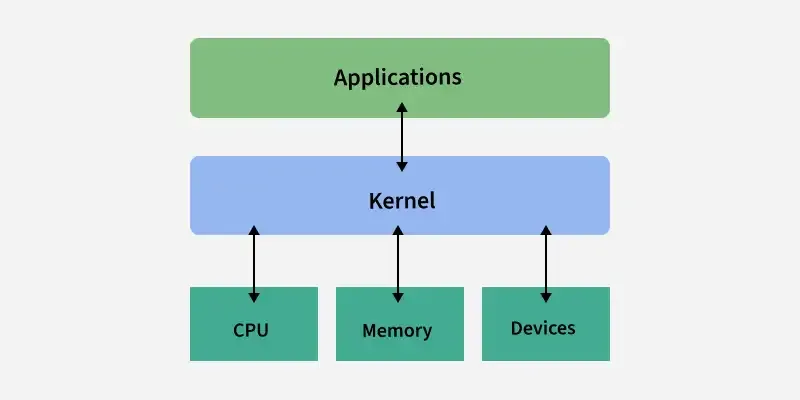
Key takeaway: The kernel is part of the operating system, not the entire operating system. A complete operating system also includes utilities, system services, libraries, and user-facing tools.
2. Why Do We Need a Kernel?
Consider opening a text file in a text editor.
The editor needs to access data stored on a disk. However, it should not independently control the storage hardware or bypass file permissions.
Instead, the editor requests access through operating-system interfaces. The kernel checks permissions, coordinates the required I/O operations through the appropriate subsystems and drivers, and returns the result.
The kernel provides the following capabilities:
- Abstraction: Programs can access files without understanding the physical details of storage hardware.
- Resource sharing: Multiple processes can share CPU time, memory, and devices.
- Protection: Processes are isolated, and privileged operations are restricted.
- Coordination: The kernel handles concurrent access and interactions between processes and hardware.
- Portability: Standard interfaces allow applications to work across different hardware implementations without directly controlling each device.
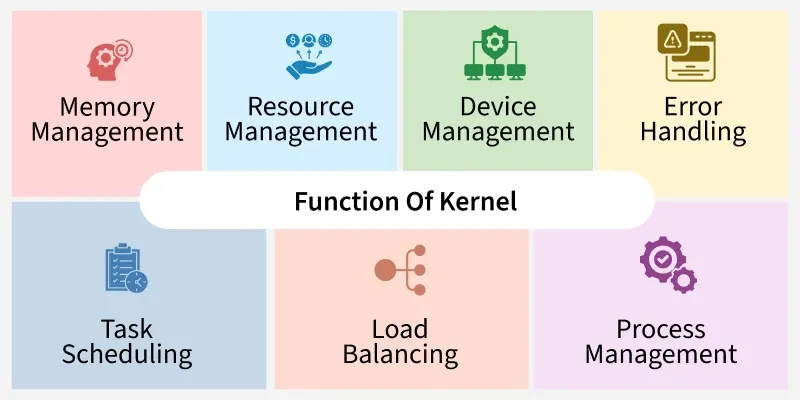
3. Major Responsibilities of the Kernel
3.1 Process Management
The kernel manages processes and threads, including their execution, scheduling, and lifecycle.
Its scheduler decides which runnable task gets CPU time. When the CPU switches from one task to another, the kernel performs the necessary context-switching operations.
Example: A browser, music player, and terminal can all make progress even when your computer has fewer CPU cores than runnable tasks.
3.2 Memory Management
The kernel manages memory allocation, virtual memory, memory mapping, and protection.
Each process generally operates within its own virtual address space. The kernel and hardware cooperate to translate virtual addresses into physical memory locations and enforce access permissions.
Example: A program cannot ordinarily read or overwrite another program's private memory simply because it knows an address.
3.3 Device and I/O Management
The kernel coordinates access to hardware through device drivers and other I/O subsystems.
Drivers provide hardware-specific functionality behind interfaces that the rest of the operating system can use.
Example: When you type on a keyboard, the kernel's input subsystem and relevant driver help make those events available to applications.
3.4 File-System Management
The kernel provides file-related operations and supports file systems that organize data into files and directories.
It works with file-system implementations, storage drivers, caching, permissions, and related I/O mechanisms.
Example: Opening /home/user/notes.txt involves resolving a path and checking access permissions before the application receives the requested data.
3.5 Networking
The kernel implements core networking functionality, including protocol processing, socket interfaces, and the handling of network packets.
Example: A browser uses networking interfaces to communicate with a remote web server. The kernel's networking stack handles much of the lower-level work.
3.6 Security and Access Control
The kernel enforces important protection boundaries, including memory permissions, privileged operations, and many file and process access checks.
However, security is not the kernel's responsibility alone. User accounts, authentication services, system configuration, and applications also play important roles.
3.7 Inter-Process Communication (IPC)
The kernel provides mechanisms that let processes communicate and coordinate, such as pipes, signals, sockets, and shared-memory facilities.
Different IPC mechanisms have different designs. For example, a pipe carries a stream of data, while shared memory lets cooperating processes access a common memory region.
4. User Mode vs. Kernel Mode
Modern operating systems use CPU privilege levels to separate ordinary application execution from privileged operating-system operations.
User Mode
- Ordinary applications normally run here.
- Access to protected hardware and kernel memory is restricted.
- Programs request privileged services through defined interfaces.
Kernel Mode
- The kernel executes with elevated privileges.
- It can perform operations that applications cannot directly perform.
- A kernel bug can have system-wide consequences because kernel code operates within a highly privileged environment.
| Feature | User Mode | Kernel Mode |
|---|---|---|
| Typical code | Applications | Kernel and kernel modules |
| Privileges | Restricted | Elevated |
| Hardware access | Through permitted interfaces | Through privileged kernel operations |
| Memory protection | Cannot freely access kernel memory | Can access protected kernel memory |
| Failure impact | Often limited to one process | Can affect or crash the whole system |
How Does a Program Enter the Kernel?
A system call provides a controlled entry point into the kernel.
For example, a program that needs to read a file may request the read() system call.

The CPU changes to a privileged execution context when the system-call mechanism is invoked. The kernel performs the requested work and returns a result.
Not every library function invokes a system call, and a system call does not necessarily access physical hardware directly.
Remember: User mode protects the system from unrestricted application access. Kernel mode enables the operating system to manage resources that require elevated privileges.
5. Types of Kernel Architectures
Kernel types describe how operating-system functionality is organized, particularly which components execute in privileged kernel space and which execute in user space.
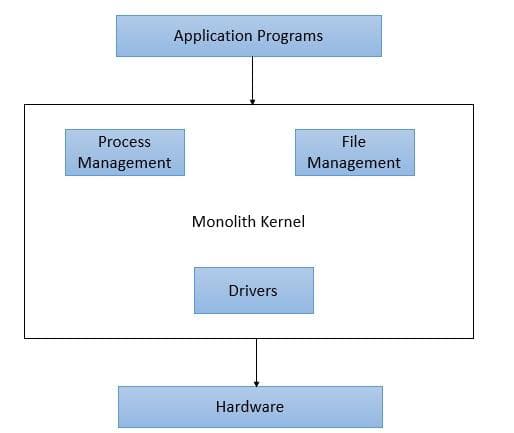
5.1 Monolithic Kernel
A monolithic kernel implements many core operating-system services within the privileged kernel environment.
These commonly include process scheduling, memory management, networking, file systems, and device drivers.
Advantages
- Efficient communication between kernel components.
- Low overhead for many internal operations.
- Strong performance potential.
Disadvantages
- A serious fault in privileged code can compromise or crash the entire system.
- The privileged codebase has a large attack surface.
- Debugging and maintaining interactions between components can be complex.
Examples: Linux and traditional Unix kernels.
Linux is a monolithic kernel, but it is also modular: it supports components such as loadable kernel modules.
5.2 Microkernel
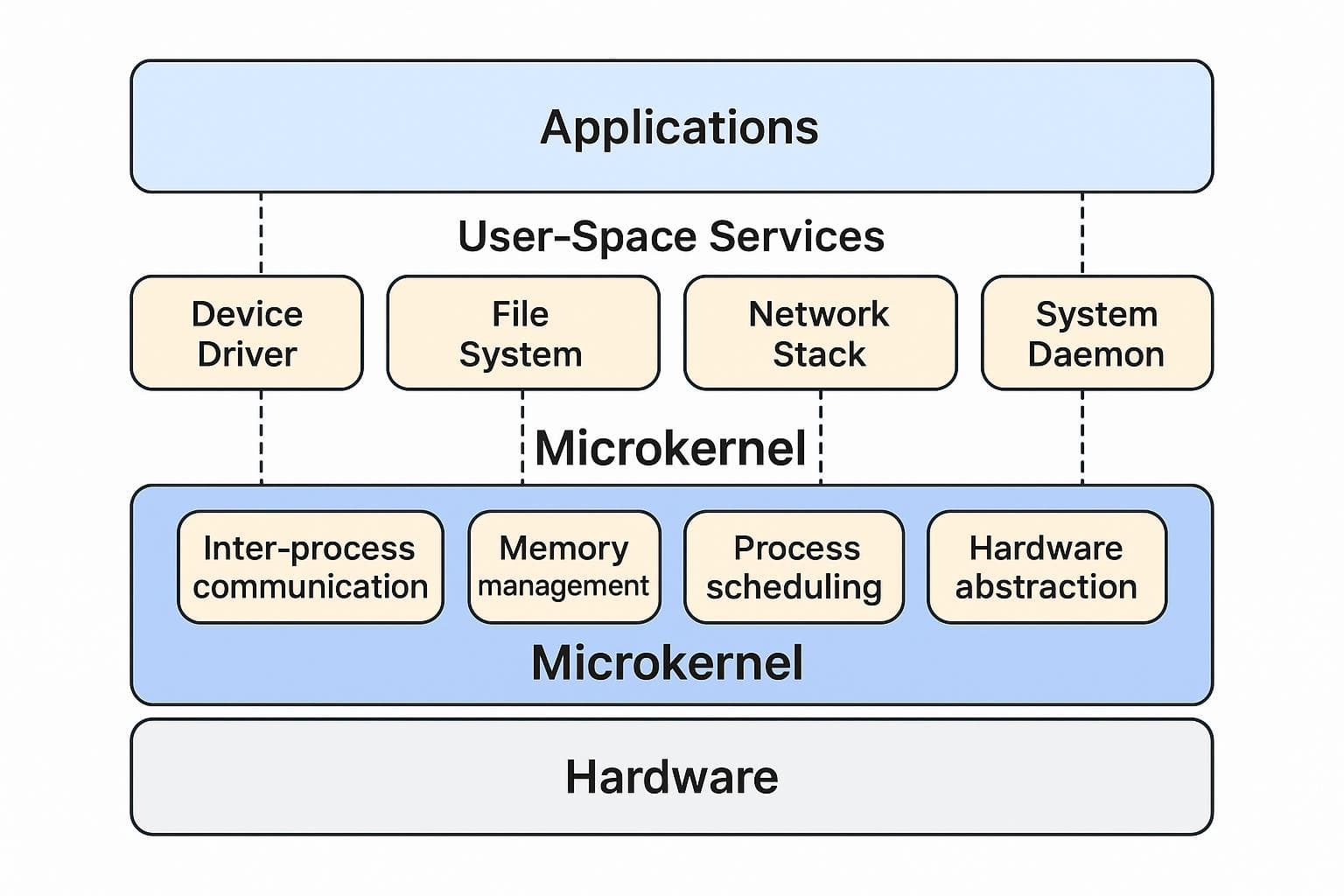
A microkernel keeps the privileged kernel relatively small. Essential mechanisms remain in kernel space, while many services—such as drivers or file-system servers, depending on the design—run as separate user-space processes.
Advantages
- Better isolation between many operating-system services.
- A failure in an isolated service may be recoverable without crashing the whole system.
- A smaller privileged core can simplify some security and reliability goals.
Disadvantages
- Communication between separate components may introduce overhead.
- Service coordination and recovery can make the architecture more complex.
Examples: MINIX 3 and QNX.
5.3 Hybrid Kernel
A hybrid kernel combines design ideas associated with monolithic kernels and microkernels. It retains substantial functionality in privileged space while using some organizational or isolation techniques associated with microkernel designs.
Advantages
- Can balance performance and modular organization.
- Allows flexibility in where services execute.
Disadvantages
- A large amount of privileged code can still create reliability and security risks.
- The hybrid label does not guarantee any particular performance or isolation property.
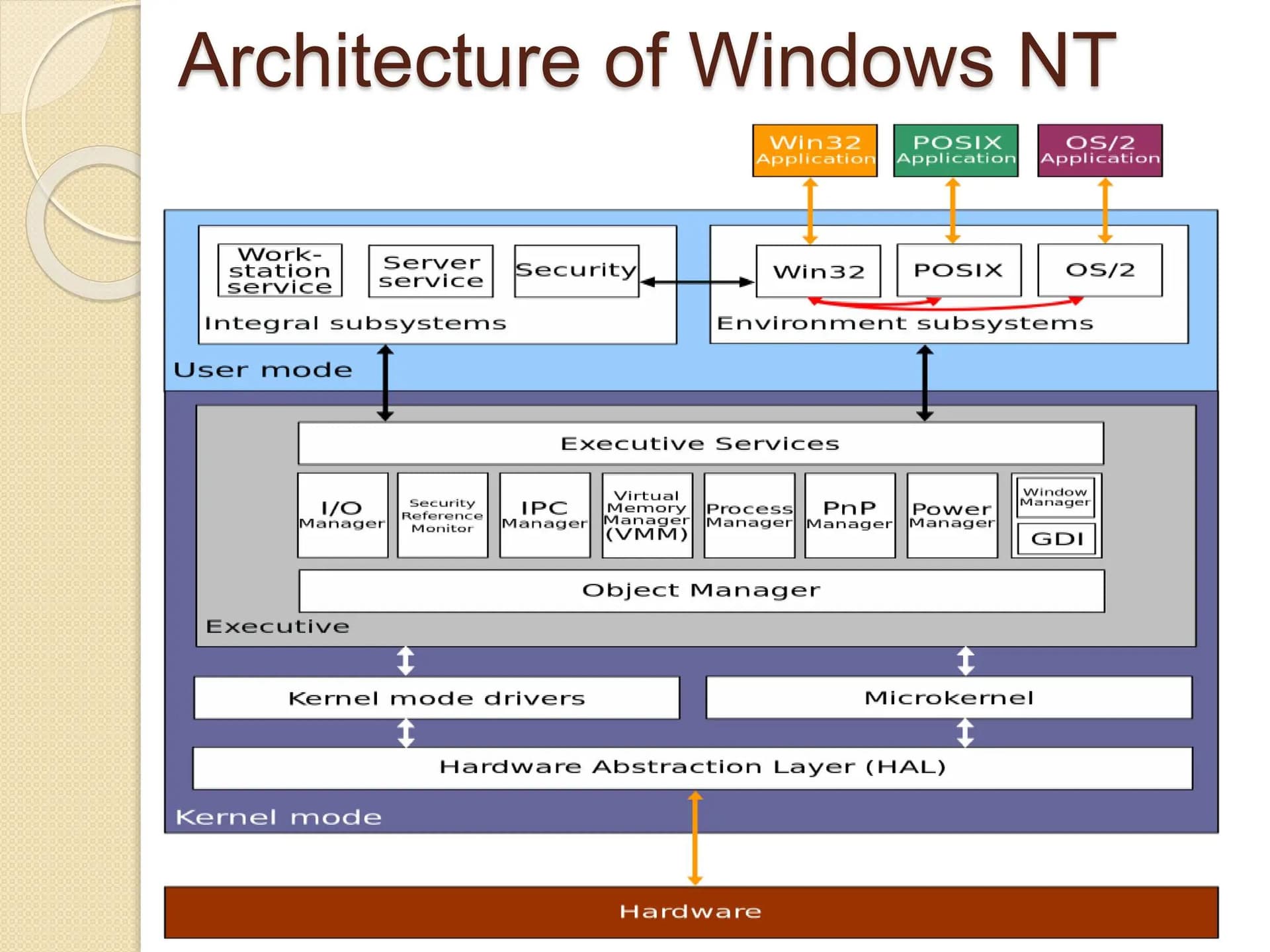
Examples: Windows NT-family kernels and Apple's XNU kernel are commonly described as hybrid designs.
5.4 Nanokernel
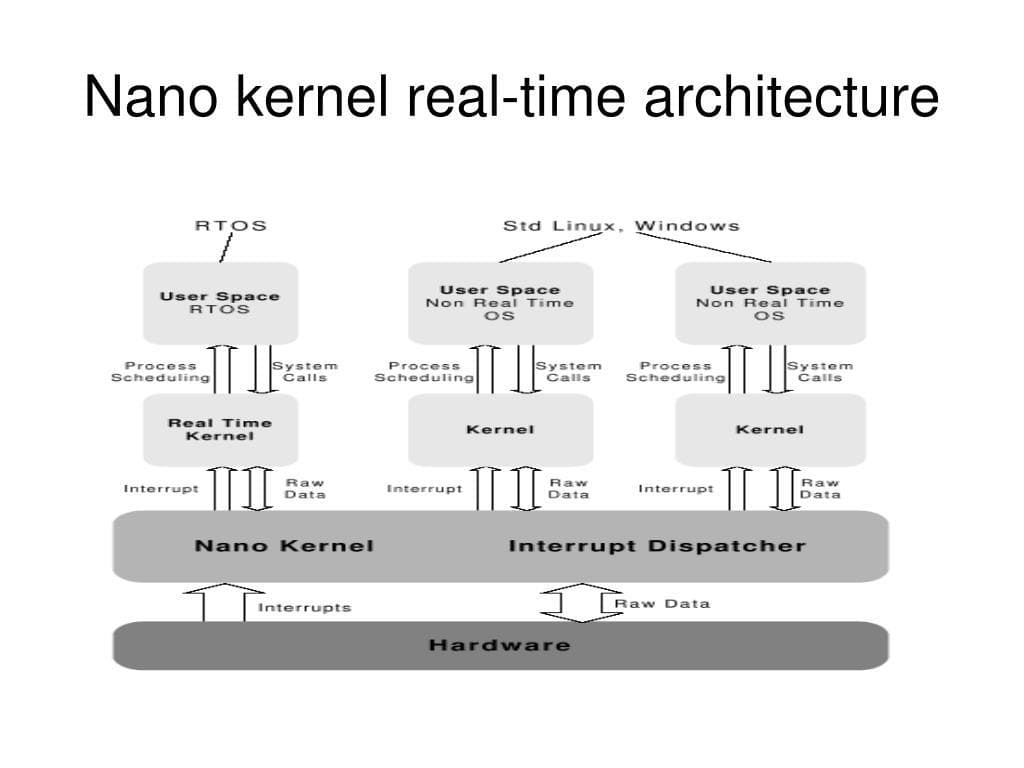
The term nanokernel is used inconsistently. It generally describes an extremely small privileged layer that provides a narrow set of low-level mechanisms, often for specialized systems.
Its precise responsibilities depend on the architecture. It is not a universally standardized category with one fixed feature set.
5.5 Exokernel
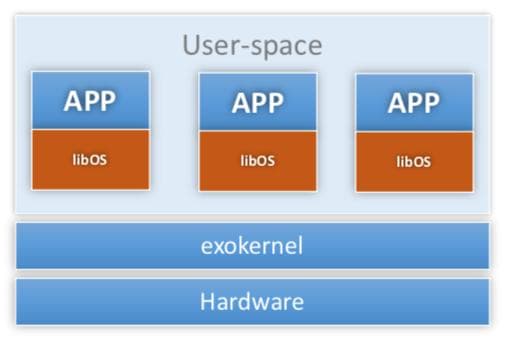
An exokernel is an architecture that aims to keep the kernel's abstraction layer minimal and securely control access to hardware resources. Applications or application-level libraries can implement higher-level abstractions themselves.
Advantages
- Greater flexibility for application-specific resource management.
- Potentially less overhead from unnecessary abstractions.
Disadvantages
- More responsibility falls on application-level software.
- Designing secure, correct resource management can be difficult.
Example: MIT's Exokernel research, including Xok.
Architecture Comparison
| Property | Monolithic | Microkernel | Hybrid | Exokernel |
|---|---|---|---|---|
| Privileged core | Relatively large | Small | Substantial | Minimal |
| Service placement | Many services in kernel | Many services in user space | Mixed design | Minimal abstractions |
| Communication overhead | Often lower internally | May be higher between services | Depends on implementation | Depends on implementation |
| Isolation strategy | Depends on kernel design | Emphasizes service isolation | Mixed approaches | Secure resource protection |
| Example | Linux | MINIX 3 | Windows NT family | MIT Xok |
Note: These are architectural tendencies, not absolute guarantees. A microkernel is not automatically faster or safer in every situation, and a modular monolithic kernel is not the same thing as a microkernel.
6. How Linux Fits into This Picture
Linux is a monolithic, modular kernel.
Its major subsystems include:
- Process scheduler: Selects runnable tasks for CPU execution.
- Memory-management subsystem: Manages virtual memory and memory protection.
- Virtual File System (VFS): Provides a common interface to different file-system implementations.
- Networking stack: Implements core network protocols and socket functionality.
- Device drivers: Enable the kernel to interact with supported hardware.
- System-call interface: Provides controlled access to kernel services.
Linux supports loadable kernel modules, allowing certain functionality to be added or removed at runtime without rebuilding the entire kernel.
For example, a driver may be provided as a module. Loading that module adds its functionality to the running kernel, but the module still executes with kernel-level privileges.
This is why the distinction between monolithic and modular matters: monolithic describes the broad execution architecture, whereas modular describes how components can be organized and loaded.
7. Practical Linux Exploration
The following commands let me inspect kernel information directly on my Linux or Kali Linux system.
7.1 Check the Kernel Release
uname -rDisplays the running kernel's release string.
7.2 Display Detailed System Information
uname -aDisplays the kernel name, hostname, release, version, architecture, and other available system information.
7.3 Inspect Kernel Version and Build Information
cat /proc/versionShows information about the running kernel, including its version and build details.
7.4 View Loaded Kernel Modules
lsmodLists currently loaded kernel modules and their reported usage information.
7.5 Inspect Kernel Messages
dmesg | lessDisplays the kernel ring buffer, which contains kernel messages such as hardware initialization and driver-related information. Access may be restricted by system policy.
7.6 Inspect Kernel-Related System Information
cat /proc/cpuinfo
cat /proc/meminfo
These expose information about the CPU and memory through Linux's virtual /proc filesystem.
Command Reference
| Command | Purpose |
|---|---|
uname -r | Identify the running kernel release |
uname -a | View general kernel and system details |
cat /proc/version | Inspect kernel build information |
lsmod | View loaded modules |
dmesg | Inspect kernel messages |
cat /proc/meminfo | Explore memory-related information |
These commands are primarily for inspection. They do not, by themselves, modify the kernel.
8. Important Distinctions
Kernel vs. Operating System
The kernel is the privileged core that manages resources and provides fundamental services. The operating system includes the kernel and the surrounding system software that makes the computer usable.
Kernel vs. Shell
The shell is a user-space program that interprets commands and launches programs. It communicates with operating-system services through available interfaces; it is not the kernel.
Kernel vs. Device Driver
A device driver is software that enables the operating system to interact with a particular device or device class. On Linux, many drivers run inside the kernel, although some device-related services can run in user space.
Kernel vs. System Call
The kernel is the component that provides privileged operating-system services. A system call is an interface through which a user-space program requests certain services from the kernel.
Monolithic vs. Modular
A monolithic kernel can still have a modular internal design. Linux's support for loadable kernel modules does not make it a microkernel.
9. Quick Revision Notes
- A kernel is the core component of an operating system.
- It manages CPU scheduling, memory, devices, file systems, networking, and protection.
- User mode restricts application privileges; kernel mode allows privileged operations.
- System calls provide a controlled interface for requesting kernel services.
- Monolithic kernels place many operating-system services in kernel space.
- Microkernels keep the privileged core small and move many services into user space.
- Hybrid kernels combine architectural ideas, while exokernels minimize the abstractions provided by the kernel.
- Linux is a monolithic, modular kernel.
- Loadable kernel modules can extend a running Linux kernel without rebuilding the entire kernel.
- The kernel is essential to an operating system, but it is not the whole operating system.
10. Knowledge Check
Try answering these questions without looking at the explanations above.
- Why can't an ordinary application directly control all hardware resources?
- What is the difference between kernel mode and user mode?
- What happens when a program requests a system call to read a file?
- Why is Linux classified as a monolithic kernel?
- If Linux is monolithic, why can it still load kernel modules?
- How does a microkernel try to improve fault isolation?
- Why might communication between microkernel services introduce additional overhead?
- What is the difference between a kernel, a shell, and a system call?
- Which command displays the currently running kernel's release?
- Why can a bug in a kernel module have more serious consequences than a bug in an ordinary application?
Practical Exercises
- Run
uname -rand record the kernel release. - Run
uname -aand identify the architecture. - Run
lsmodand inspect a few loaded modules. - Run
cat /proc/meminfoand identifyMemTotalandMemAvailable. - Explain the journey of a file-reading request from an application to the kernel and back.
- Write a short comparison of monolithic and microkernel architectures using your own examples.
Notes & References
Primary Learning Resource
Further Reading [pending]
- The Linux Kernel Documentation — Official documentation covering Linux kernel subsystems and development.
- Linux Kernel Labs — Introduction to the Linux Kernel — Educational material covering user space, kernel space, system calls, and kernel architectures.
- Linux Kernel Documentation — Introduction to Kernel Development — Background on the Linux kernel project and development process.
Journal note: Understanding the kernel gives me the foundation for exploring Linux internals. My next step is to connect these concepts with the boot process, system calls, process management, and memory management.